6 min. reading

Yulii Cherevko
CEO paintit.ai
Published: Updated:

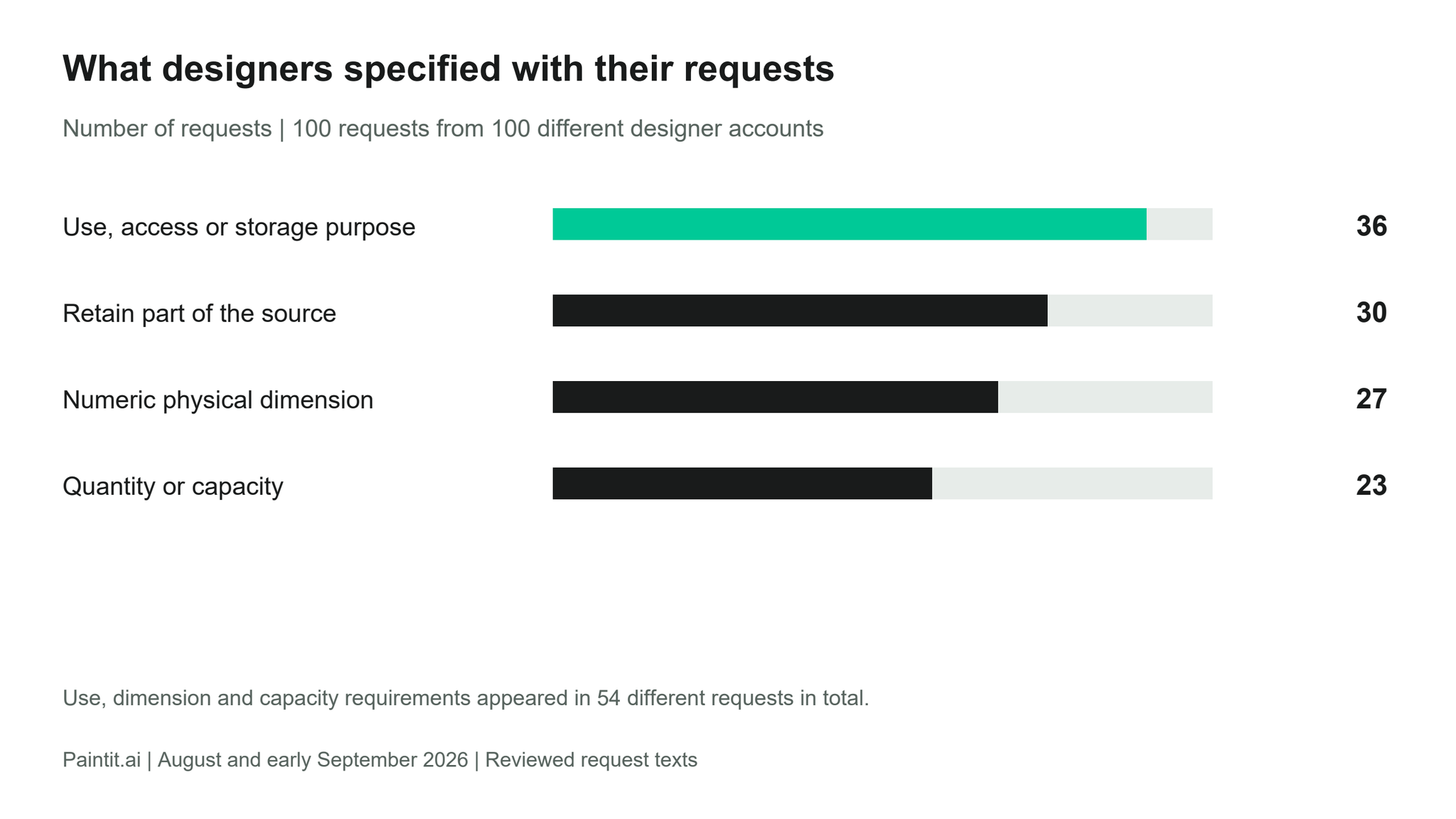
Paintit.ai reviewed 100 English-language design requests from 100 accounts identifying as interior designers. In this sample, 54 included a physical measurement, a quantity or capacity, or a practical use requirement. Storage and built-ins appeared in 38 requests. Among the 26 requests explicitly asking for rendering or visualization, 19 also specified something that must stay.
These findings give a designer three useful questions to settle before generating a concept: what must fit, what must remain, and what the client should be able to judge from the image. A wardrobe brief about long garments needs a different review from a finish study of the same wardrobe.
The examples below are editorial reconstructions of recurring requirements in the reviewed texts. They are not customer quotations or demonstrations of tested outputs.
We coded physical dimensions in 27 requests, explicit quantities or capacities in 23, and practical use, access or storage requirements in 36. These categories overlap: together they occurred in 54 distinct requests. Measurements included room footprints, cabinet widths and clearances; quantities included seats, rooms and storage divisions.
For a client brief, distinguish the information already measured from the decision still open. A request for a wider cabinet can mean more internal storage, a different door arrangement or a different balance on the wall. Recording the width alone does not resolve those alternatives.
Ask for the number that governs the decision: the furniture footprint, the required seat count, the available wall width or the opening that must remain usable. Write its source beside it. A dimension supplied by the client remains a supplied dimension until checked on site; a convincing perspective image does not verify the measurement.
For example, a cabinet revision might ask for two doors within a fixed overall width while retaining the rest of the composition. The review then concerns door division, access and usable storage. A more elaborate finish description would leave those questions unanswered.
38 of the 100 requests concerned storage or built-ins. Of those 38, 22 specified a practical use requirement and 18 supplied a physical dimension. Those two subgroups can overlap. The texts included hanging clothes, storing shoes and bags, displaying objects, organizing work equipment and fitting storage around access routes.
Begin the storage brief with an inventory. Identify which items need long hanging space, which can be folded, which need visibility and which must be reachable without moving something else. Then record the largest relevant items and the space available for the unit. This turns “more storage” into requirements that can be checked.
An entryway example makes the distinction concrete. The proposed unit might need space for schoolbags and shoes while leaving the route past a stair usable. A tall closed cupboard and a shallow open arrangement could both look attractive, but their usefulness depends on the inventory and access requirement. Show that trade-off explicitly when presenting alternatives.
Across the whole sample, 30 requests included a retention instruction. Within the narrower rendering and visualization group, 19 of 26 did so. Examples included retaining a wardrobe's structure while changing its internal organization, preserving room openings during a finish study, and keeping a design consistent while requesting another view.
Write those as separate jobs. For another view of an approved kitchen, list the cabinet arrangement and material decisions that remain fixed. For a material alternative, identify the surface allowed to change and keep the comparison viewpoint consistent where possible. Review the resulting image against those instructions.
A reference can also have a narrow job. In the reviewed requests, references supplied a material, an object, a style direction or an existing design to retain. Specify which role applies. Borrowing a wood finish does not require borrowing the reference room's window arrangement.
In Paintit, the Main Image establishes the space or asset to edit; an Item identifies a specific object; a Reference supplies selected visual qualities. The Paintit workspace for professional concept studies supports working with visual inputs and follow-up instructions. Important retained details still need comparison with the source image.
The British Institute of Interior Design's guidance on the brief emphasizes the client's goals, scope and requirements. Our request review adds specific questions about storage, capacity and retained features that a visual brief can make explicit.
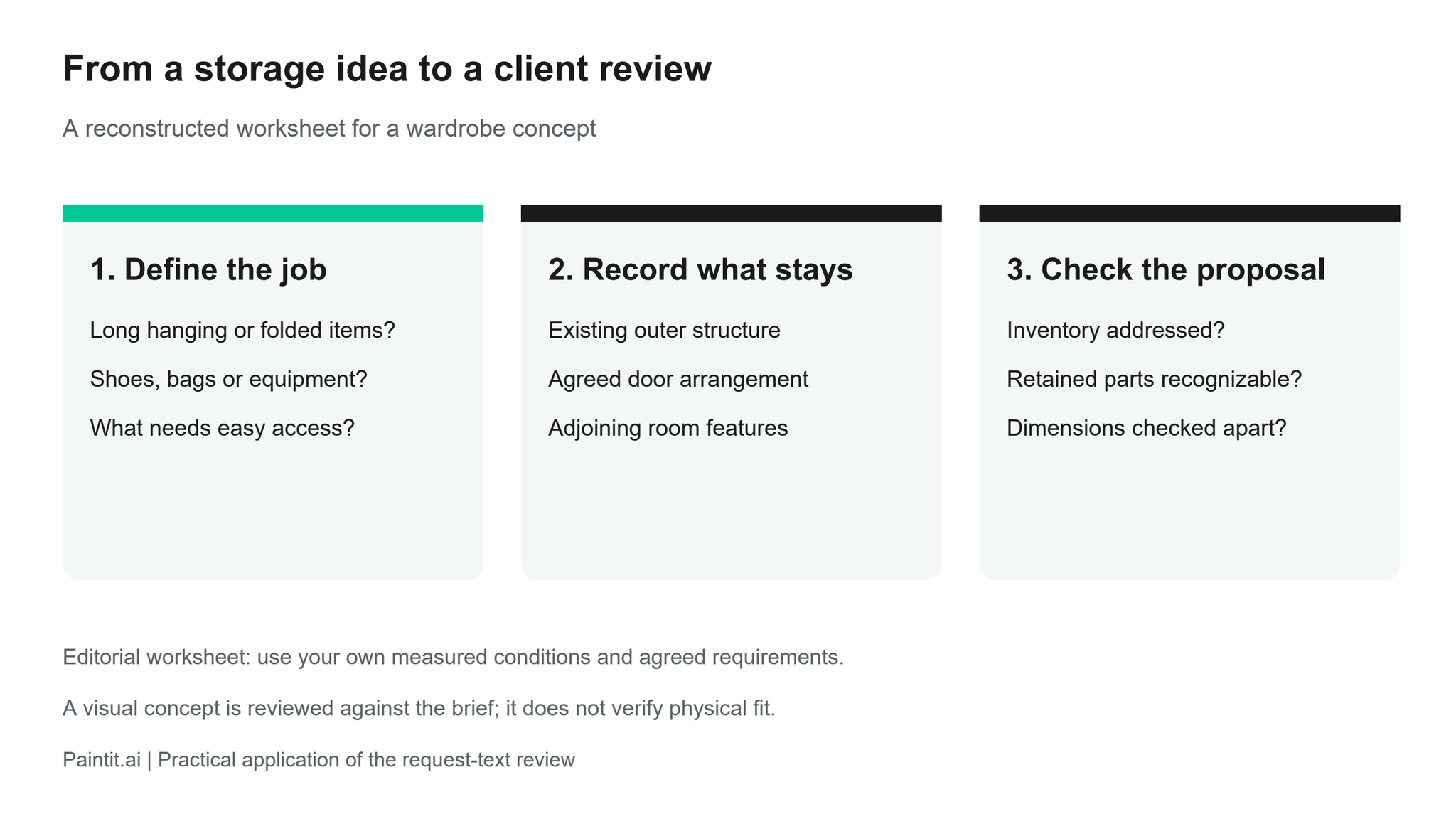
| Record | Example for a storage decision | Check at review |
|---|---|---|
| Decision still open | More useful hanging and shoe storage within the existing unit. | Does each alternative address that inventory? |
| Physical conditions | Measured unit width, depth and door access; identify unverified sizes. | Are the relevant dimensions checked separately? |
| What stays | Existing outer structure, adjoining wall and other agreed room features. | Can the client recognize those retained features? |
| Reference role | Use the reference for finish character only. | Has an unrelated layout or object been introduced? |
| Deliverable | A concept image for discussion; measured details handled in project documentation. | Is the client approving a visual direction or a technical specification? |
Name the approval sought before presenting the alternatives. It might be the storage arrangement, a material direction or the relationship between a proposed item and the room. Note any unresolved dimensions, samples and product details separately. That record gives the next discussion a clear subject, even when the visual is still exploratory.
For wording that describes a focused edit, our guide to specifying a visual change provides a useful companion. The worksheet above supplies the project conditions that belong around that instruction.
We used an AI-assisted thematic review of one substantive English-language request from each of 100 separate accounts that selected the interior-designer role, drawn from Paintit's August and early September 2026 research sample. Requests were selected in a fixed order, excluding unrelated content and probable templates. Most concerned interiors; exterior and site briefs were also included. Categories overlap. The figures describe this sample's submitted requirements, not industry-wide behavior or tested design outcomes. The coding was not independently validated.
Treat a storage concept as an answer to an inventory and access question. Treat another view as a study of the agreed design unless the client has reopened a design decision. Those are different deliverables, and the request texts show concrete requirements for reviewing each.
Before your next concept study, record the open decision, the physical conditions and the features already agreed. Use that same record to review the image with the client. It makes clear what the concept answers and what still needs a measurement, sample or project decision.