6 min. reading

Yulii Cherevko
CEO paintit.ai
Published:
In an AI-assisted review of 60 English-language paint and color-edit requests from 60 different Paintit accounts, 24 named more than one surface family to change. Eighteen assigned different colors to particular targets or zones. A palette alone would not describe those instructions: the brief also needed to say where each color belonged.
The distinction matters when you choose a scheme for your own room. Blue walls with a blue ceiling and white doors describe one arrangement. Blue walls with a white ceiling describe another, even if the same blue appears on both sample boards. Start your comparison with the painted areas, then assess the shades.
We could classify both the intended color count and surface grouping in 32 of the reviewed requests. A surface family means a category such as walls, ceiling, trim or cabinetry; separate wall zones still belong to the walls family.
Of the 13 requests specifying one color with a clear surface grouping, 12 addressed one family and one extended that color across several. Of the 19 specifying multiple simultaneous colors with a clear grouping, four addressed one family and 15 addressed several.
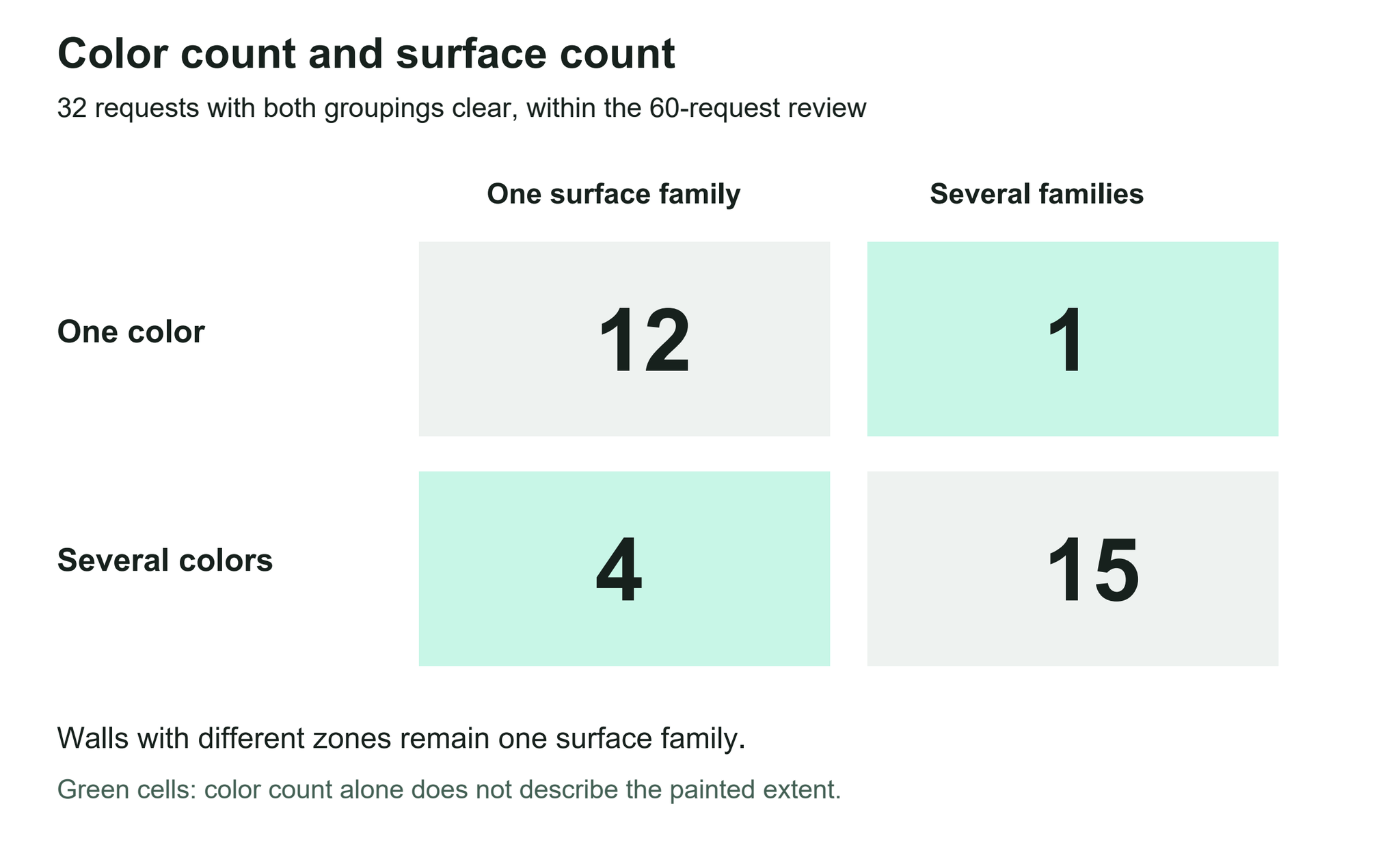
The four multicolor requests within one family included different wall treatments. Choosing several shades did not necessarily mean painting more kinds of surfaces. The one-color example across families explicitly joined walls and ceiling while protecting other finishes. These are observed instructions, not a test of which arrangement looks better.
Use two separate questions when discussing a proposal: how many colors will appear together, and which physical areas will receive them? Asking for three alternative wall colors is a different task from asking for three colors in the same room.
Thirteen of the 60 requests identified a localized area or boundary, such as a particular wall side, a section above an opening, or a transition into an adjoining space. Eight explicitly excluded a surface or area from recoloring. These categories overlap.
One instruction pattern extended a color onto trim while leaving the doors alone. Another divided a fixed unit into a colored center and a contrasting border. A third gave the ceiling and its molding one color, the walls another, and lower trim a separate treatment. Those are placement decisions that a row of unlabelled swatches cannot communicate.
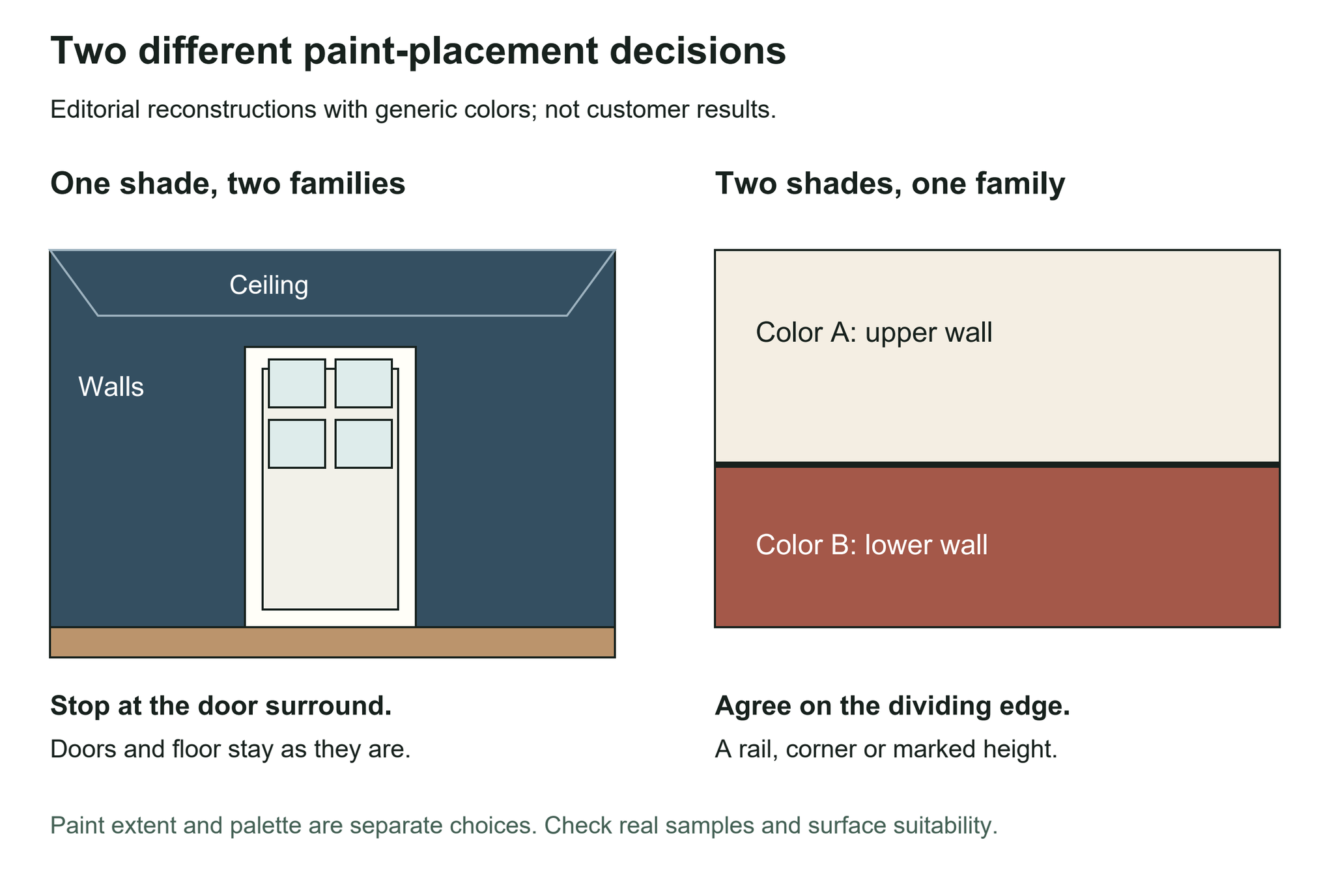
In the first diagram, the same shade crosses the wall-to-ceiling junction but stops at the white door surround. In the second, two colors share one wall family and meet at a defined horizontal boundary. The generic colors illustrate the instruction patterns.
For your own scheme, name the edge you intend to use: the top of paneling, a wall corner, the inner edge of a door frame or the opening between two rooms. If that edge is not visible in the photo, add another view or a marked sketch for the discussion.
Give each area its own row before requesting a preview or discussing the work with a painter. Use a temporary label such as Color A while the shade is undecided. Keep an existing finish as an explicit choice rather than leaving its treatment to assumption.
| Target or zone | Color reference or existing finish | Stop line and exception |
|---|---|---|
| Room: ___ Walls or selected wall: ___ |
Brand/name/code, or Color A: ___ | Continue around corners? ___ Stop before adjoining room? ___ |
| Upper/lower wall section: ___ | Color A / Color B: ___ | Named edge or agreed height: ___ |
| Ceiling and molding: ___ | Match walls / separate color / keep existing: ___ | Include molding? ___ Leave other trim alone? ___ |
| Frames, skirting and doors: ___ | Assign each, or keep existing: ___ | Door leaf and frame treated separately? ___ |
| Cabinet fronts and borders: ___ | Center: ___ Border: ___ |
Which panels, edges and adjacent surfaces stay? ___ |
This is a color-placement sheet, not a product specification. The same color name does not mean that the same coating is suitable for walls, joinery and every other surface. Confirm the substrate, preparation, paint product and sheen separately with the manufacturer or painter.
For a useful first comparison, hold the chosen color direction steady and change its extent: walls only in one proposal, walls and ceiling in another. Or retain the door leaf in both and compare whether its frame matches the wall. Label the alternatives so everyone knows which decision is being reviewed.
Benjamin Moore's monochromatic scheme guide distinguishes a single shade from several shades of one hue. Specify which you intend; a broad request for a beige room can still leave the relationship between its surfaces open.
For connected spaces, include the transition in the comparison. Sherwin-Williams' open-concept painting guidance treats ceiling, trim and color transitions as parts of the plan. A view through the doorway can help you discuss where one room's treatment should end.
Paintit's paint previews for walls, doors and trim provide a place to explore those directions. The paint catalog includes Behr, Benjamin Moore, Dulux, Nippon Paint and Sherwin-Williams, with brand filters and search by name, code or HEX. A catalog reference helps identify the intended shade; check physical samples and the finished paint system before buying.
Review the image against the sheet: did the color reach the intended edge, did the door remain separate from its frame, and did an excluded finish change? Keep those checks separate from whether you like the palette. A rendered image does not establish an exact physical paint match.
We reviewed one substantive English-language paint or architectural color-edit request from each of 60 accounts in Paintit's August and early September 2026 data. Requests followed a fixed selection order within a targeted paint-related sample, excluding unrelated material, copied interface or assistant text and probable templates. The review included indoor and outdoor spaces. Coding was AI-assisted and not independently validated. The color-count comparison uses the 32 requests where both variables were clear; it does not treat alternatives as simultaneous colors. This describes submitted instructions, not customer outcomes or market preferences.
Our earlier study of paint choices alongside other design tasks examined the scope of people's selected interests. This analysis examines how color is assigned within a submitted design request.
A swatch tells you the color to discuss. Your placement sheet tells you what that choice means in the room: which surface receives it, where it stops and which neighboring finish remains. Settle those decisions together before turning a visual direction into a purchase or painting brief.


