5 min. reading

Yulii Cherevko
CEO paintit.ai

Choosing the right paint color for your home can feel like a high-stakes decision. That perfect shade of sage green on a tiny swatch can look completely different stretched across an entire wall. This is precisely why an AI wall paint visualizer has become such an essential tool. It offers a seamless way to preview changes in your actual space. Just upload a photo, and you can cycle through colors to find the perfect match without ever lifting a brush.
Here at Paintit.ai, we designed our platform to take this a step further. We've found that true design confidence comes from seeing the whole picture. Our tools don't just let you change wall colors; they help you see how that new paint harmonizes with different furniture, flooring, and decor. In this review, we've also looked at competitors like HGTV Home® by Sherwin-Williams, Behr, Sherwin-Williams, PPG Paints, DeHome.AI, Paint AI, Pixelcut, VisualGPT, and Wizart.AI. This guide explores the best options available in 2026 to help you find the right rhythm for your space. To understand more about the underlying technology, you can explore our post on how AI is changing wall paint design.
AI paint visualizers primarily use computer vision and generative AI to work their magic. When you use an interior paint color visualizer app AI upload room photo, several processes happen behind the scenes. First, computer vision algorithms, especially semantic segmentation, identify the different parts of your photo-walls, ceiling, floor, furniture, and trim.
Advanced tools use sophisticated edge detection to create a precise mask of the wall, ensuring paint is applied only where it should be. Generative AI then fills this masked area with your chosen color, intelligently simulating how your room's existing light sources and shadows would interact with the new paint. This creates a much more realistic preview than simply overlaying a flat color.
The market for AI paint visualizers can be segmented into a few key categories. There are tools integrated directly with major paint brands, offering a direct path from visualization to purchase. Then there are independent, AI-first platforms that provide more creative flexibility and broader design capabilities.
| Tool Name | Market Segment | Primary User |
|---|---|---|
| Paintit.ai | Comprehensive AI Design Platform | Homeowners, Designers, Real Estate |
| DeHome.AI | AI-First Paint Visualizer | DIYers, Designers |
| Sherwin-Williams Visualizer | Brand-Specific Tool (App) | Sherwin-Williams Customers |
| Behr Visualizer | Brand-Specific Tool (Web) | Behr Customers |
| Pixelcut | Freemium AI Tool | Casual Users, Quick Previews |
| Wizart.AI | B2B / Enterprise Solution | Retailers, E-commerce |
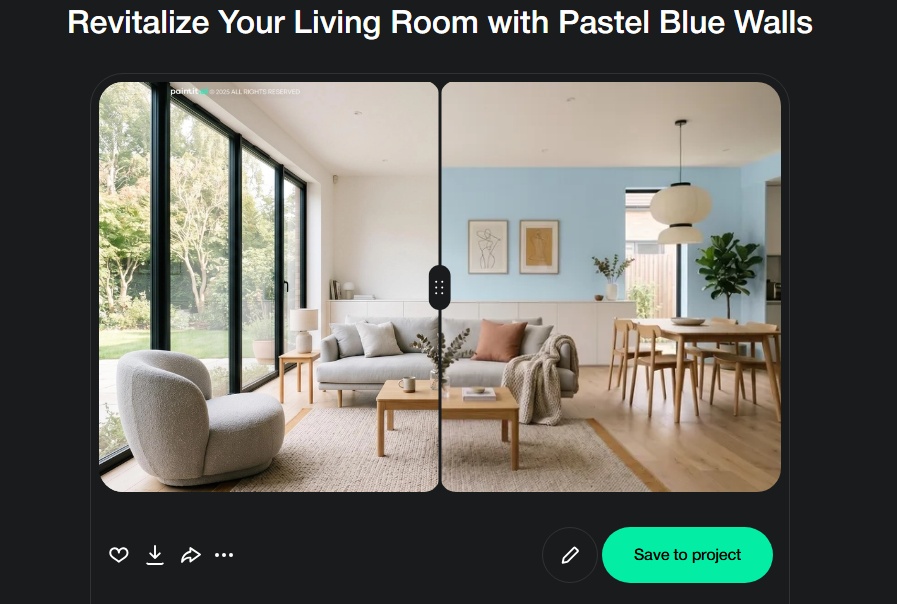
Paintit.ai is more than just a paint visualizer; it's a complete interior design platform. While its ability to apply new paint colors to your walls is exceptionally realistic, its true strength lies in showing you how that color interacts with a full room redesign. You can change the paint, swap the sofa, try a new rug, and see it all come together in a cohesive, photorealistic render.
This makes it one of the Best AI paint visualizers for interior walls because it answers the next logical question: "Now that I've picked a paint color, will it match my new furniture?" Based on real visualization workflows, we've observed that users gain significant confidence when they can test not just a new wall color, but also how it impacts the overall feel of a room with different decor styles.
DeHome.AI is a powerful and focused AI paint visualizer that truly excels at showing how colors will look under different lighting conditions. Users can upload a photo and instantly apply colors from curated palettes or custom HEX codes. Its standout feature is the ability to toggle between natural daylight, evening, and artificial light views, which is crucial for making an informed decision.
For those loyal to Sherwin-Williams, their Color Visualizer tool, primarily delivered through the Color Expert™ App, is a seamless solution. It gives you access to the brand's entire color catalog and lets you digitally paint your room. The integration is tight, allowing you to easily find a local store or order samples directly from the app.
Pixelcut offers a free and incredibly simple AI wall paint visualizer. It's designed for speed and ease of use. You upload your photo, type in a color description (e.g., "light sage green" or "warm beige"), and the AI paints the walls for you. It does a surprisingly good job of detecting edges and working around furniture for a quick, no-frills preview.
| Feature | Paintit.ai | DeHome.AI | Sherwin-Williams | Pixelcut |
|---|---|---|---|---|
| Photo Upload | Yes | Yes | Yes | Yes |
| Brand-Agnostic Color | Yes | Yes (HEX code) | No | Yes (Text prompt) |
| Furniture Visualization | Yes | No | No | No |
| Lighting Simulation | Realistic Rendering | Yes (Multiple Modes) | Basic | Basic |
| Platform | Web-based | Web-based | Mobile App | Web-based |
| Primary Focus | Full Room Design | Paint Color | Brand Paint | Paint Color |
For interior designers, architects, and real estate professionals, the requirements often go beyond simple color swapping. Tools in this category need to offer higher fidelity, more control, and features that support a professional workflow.
Wizart.AI, for example, is a B2B solution designed for retailers to integrate into their own websites, offering their customers a high-quality visualization experience. For individual professionals, the key is finding a tool that provides photorealistic output. The quality of the final image is paramount for client presentations. This is where high-fidelity rendering becomes essential, turning a simple concept into a compelling visual. Paintit.ai's AI rendering capabilities are built to serve this need, providing designers with client-ready visuals that accurately represent the final design intent. These tools help bridge the gap between imagination and reality for all stakeholders.
Choosing the right tool depends entirely on your project's scope. Here's a simple framework to guide your decision:
No matter how realistic AI becomes, the final step should always involve the real world. Light interacts with physical paint in ways that are still challenging to perfectly replicate on a screen. Here is a seamless workflow from idea to execution:
While AI paint visualizer tools interior wall color visualizer app interior paint colors are incredibly helpful, it's important to understand their current limitations.
The "best" app depends on your needs. For a holistic view that includes furniture and decor, Paintit.ai is a top choice. For specific brand integration, tools from Sherwin-Williams or Behr are excellent. For quick, free previews, Pixelcut is very effective.
Yes, nearly all modern visualizers, especially web-based ones like Paintit.ai, are mobile-friendly. You can take a photo of your room with your phone and upload it directly to the platform to start designing immediately.
They are highly accurate for visualization and decision-making but should be treated as a guide, not a perfect replica. They provide an excellent representation of the color in your space, but the final look will always be influenced by real-world factors like paint sheen and unique lighting. Always confirm with a physical sample.
Many of them do. Platforms like Paintit.ai offer dedicated tools for exterior house design, allowing you to visualize paint colors on siding, trim, and doors. Brand-specific tools like those from Sherwin-Williams also typically have exterior visualization options.
Choosing an interior paint color is no longer a process of guesswork and hope. The best AI paint visualizers for interior walls have transformed the way we approach design, providing an intuitive and personal way to see the future of our spaces. By leveraging an AI wall paint visualizer, you can move from idea to execution with confidence.
While brand-specific apps offer a direct route for trying their colors, platforms like Paintit.ai provide a more complete design rhythm. At Paintit.ai, we believe color is a conversation with the rest of your room. It's about seeing how a new shade of blue on the walls flows with the texture of a wooden floor and the shape of a new armchair. This holistic approach ensures the final result feels just right. We created a guide on how to repaint a room with Paintit.ai to help you get started.
Ready to find the perfect color for your space? Start designing today and see your vision come to life.