We use essential cookies to make our site work. With your consent, we may also use non-essential cookies to improve user experience, personalize content, and analyze website traffic. For these reasons, we may share your site usage data with our social media and analytics partners. By clicking “Accept,“ you agree to our website's cookie use as described in our Cookie Policy. You can change your cookie settings at any time on your browser preferences.
  • Sobre nosotros
  • Precios
  • Blog
  • Contacto
  • Programa de afiliados
AiEi

Productos

  • Para diseñadores de interiores
  • Para e-commerce
  • Para inmobiliarias

Herramientas

Generador de arquitectura con IA
Generador de conceptos con IA
Diseño exterior con IA
Generador de casas con IA
Pintor de casas con IA
Diseño de paisajes con IA
Renderizado con IA
Diseño de habitaciones con IA
Herramienta de diseño exterior de casas
Home staging virtual con IA
Remodelación de baños con IA
Generador de planos con IA
Generador de muebles con IA
Colocación de muebles con IA
Renovación exterior de viviendas
Visualizador de colores de pintura con IA
Remodelación de cocinas con IA
Visualizador de alfombras con IA
Mejora de fotos inmobiliarias
  • Términos de servicio
  • Política de privacidad
  • Confianza
Logo
Paintit.ai - herramienta gratuita de diseño de interiores con IA

© 2026

Apoya a Ucrania
PAINTITAI LTD, 52 Leytonstone road, London, E15 1SQ, UK
Paintit.ai - ai home design free
  • Precios
  • Sobre nosotros
  • Blog
  • Contacto
/Blogs/Best AI Paint Visualizers
AI interior design
19 may 2026

5 min. reading

Best AI Paint Visualizers for Interior Walls in 2026 

avatar-blog

Yulii Cherevko

CEO paintit.ai

Share
  • ChatGPT
  • Perplexity
  • Claude
  • Grok
  • Google AI
Best AI Paint Visualizers for Interior Walls in 2026

Page [break] Contents: 

  • 1. Key Takeaways
  • 2. How AI Works in Paint Visualizers
  • 3. Comparing AI Paint Visualizer Software
  • 4. Top AI Paint Visualizer Tools in 2026
  • 5. Detailed Feature Comparison
  • 6. Professional Tools for Advanced Users
  • 7. Strategic Recommendations
  • 8. The Ultimate Hybrid Workflow
  • 9. Managing Expectations: Current AI Limitations
  • 10. FAQ
  • 11. Conclusion

Key Takeaways

  • An AI wall paint visualizer lets you upload a photo of your room and digitally test paint colors before you buy. This saves time and helps avoid costly mistakes.
  • Paintit.ai offers a comprehensive solution. It doesn't just show paint on a wall; it lets you visualize new colors in context with different furniture, materials, and overall design styles.
  • Tools vary significantly. Some are tied to specific paint brands like Sherwin-Williams or Behr. Others, like Paintit.ai, are brand-agnostic, giving you more creative freedom.
  • The best tools use AI for realistic edge detection and accurately simulate how light and shadows affect color in your specific space.
  • For a complete design process, the ideal workflow combines an AI visualizer for initial ideas with physical paint samples for final confirmation.

Choosing the right paint color for your home can feel like a high-stakes decision. That perfect shade of sage green on a tiny swatch can look completely different stretched across an entire wall. This is precisely why an AI wall paint visualizer has become such an essential tool. It offers a seamless way to preview changes in your actual space. Just upload a photo, and you can cycle through colors to find the perfect match without ever lifting a brush.

Here at Paintit.ai, we designed our platform to take this a step further. We've found that true design confidence comes from seeing the whole picture. Our tools don't just let you change wall colors; they help you see how that new paint harmonizes with different furniture, flooring, and decor. In this review, we've also looked at competitors like HGTV Home® by Sherwin-Williams, Behr, Sherwin-Williams, PPG Paints, DeHome.AI, Paint AI, Pixelcut, VisualGPT, and Wizart.AI. This guide explores the best options available in 2026 to help you find the right rhythm for your space. To understand more about the underlying technology, you can explore our post on how AI is changing wall paint design.

How AI Works in Paint Visualizers

AI paint visualizers primarily use computer vision and generative AI to work their magic. When you use an interior paint color visualizer app AI upload room photo, several processes happen behind the scenes. First, computer vision algorithms, especially semantic segmentation, identify the different parts of your photo-walls, ceiling, floor, furniture, and trim.

Advanced tools use sophisticated edge detection to create a precise mask of the wall, ensuring paint is applied only where it should be. Generative AI then fills this masked area with your chosen color, intelligently simulating how your room's existing light sources and shadows would interact with the new paint. This creates a much more realistic preview than simply overlaying a flat color.

Comparing AI Paint Visualizer Software

The market for AI paint visualizers can be segmented into a few key categories. There are tools integrated directly with major paint brands, offering a direct path from visualization to purchase. Then there are independent, AI-first platforms that provide more creative flexibility and broader design capabilities.

Tool Name Market Segment Primary User
Paintit.ai Comprehensive AI Design Platform Homeowners, Designers, Real Estate
DeHome.AI AI-First Paint Visualizer DIYers, Designers
Sherwin-Williams Visualizer Brand-Specific Tool (App) Sherwin-Williams Customers
Behr Visualizer Brand-Specific Tool (Web) Behr Customers
Pixelcut Freemium AI Tool Casual Users, Quick Previews
Wizart.AI B2B / Enterprise Solution Retailers, E-commerce

Top AI Paint Visualizer Tools in 2026

Paintit.ai - Best for Holistic Room Design

AI Paint Visualizer Tool

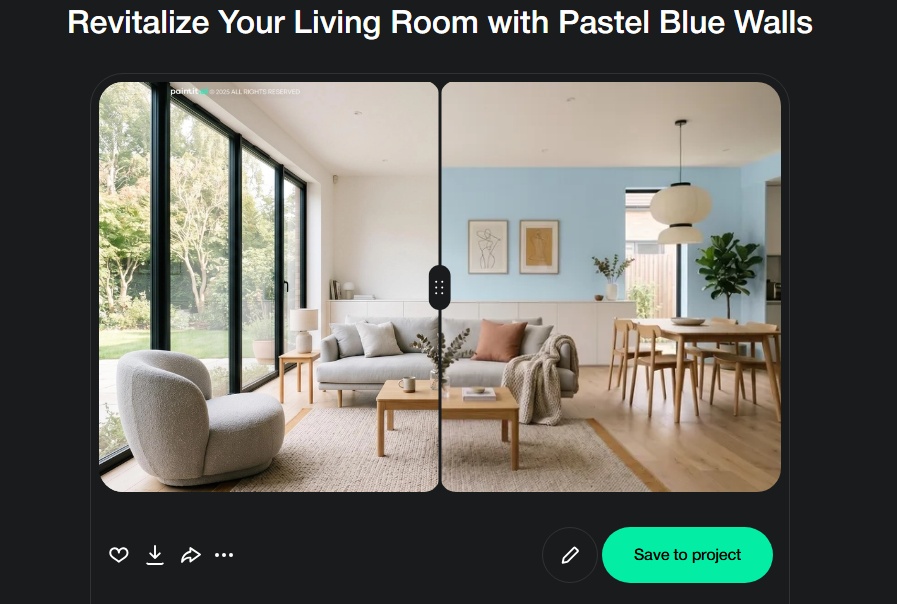
Paintit.ai is more than just a paint visualizer; it's a complete interior design platform. While its ability to apply new paint colors to your walls is exceptionally realistic, its true strength lies in showing you how that color interacts with a full room redesign. You can change the paint, swap the sofa, try a new rug, and see it all come together in a cohesive, photorealistic render.

This makes it one of the Best AI paint visualizers for interior walls because it answers the next logical question: "Now that I've picked a paint color, will it match my new furniture?" Based on real visualization workflows, we've observed that users gain significant confidence when they can test not just a new wall color, but also how it impacts the overall feel of a room with different decor styles.

  • Best for: Homeowners and designers who want to visualize a new paint color as part of a larger room makeover, including furniture and material changes.
  • Pros: Brand-agnostic color choices, visualizes paint with new furniture and decor, highly realistic rendering that accounts for light and shadow, web-based and instantly accessible.
  • Cons: The comprehensive features may be more than what's needed for a user who only wants to test a single paint brand's color.
  • Pricing: Free trial available with 30 credits. Paid plans for more extensive use.
  • Platform: Web-based.
  • You can test out our AI house painter tool to see how it works on your own walls.

DeHome.AI - Best for Lighting Simulation

DeHome.AI is a powerful and focused AI paint visualizer that truly excels at showing how colors will look under different lighting conditions. Users can upload a photo and instantly apply colors from curated palettes or custom HEX codes. Its standout feature is the ability to toggle between natural daylight, evening, and artificial light views, which is crucial for making an informed decision.

  • Best for: Users who are primarily concerned with how a paint color will look at different times of the day.
  • Pros: Excellent lighting simulation, supports custom HEX codes, high-resolution output.
  • Cons: Operates on a credit system that can be limiting for extensive free use, focuses mainly on color rather than overall design.
  • Pricing: Free to start, then credit-based.
  • Platform: Web-based.
  • Official site: dehome.AI

Sherwin-Williams Color Visualizer - Best for Brand Integration

For those loyal to Sherwin-Williams, their Color Visualizer tool, primarily delivered through the Color Expert™ App, is a seamless solution. It gives you access to the brand's entire color catalog and lets you digitally paint your room. The integration is tight, allowing you to easily find a local store or order samples directly from the app.

  • Best for: DIYers who have already decided to use Sherwin-Williams paint.
  • Pros: Direct access to the full Sherwin-Williams color library, convenient mobile app experience, easy to order samples.
  • Cons: Limited exclusively to Sherwin-Williams colors, requires an app download.
  • Pricing: App is free to download.
  • Platform: Mobile App (iOS & Android).
  • Official site: sherwin-williams.com

Pixelcut - Best for Quick, Free Previews

Pixelcut offers a free and incredibly simple AI wall paint visualizer. It's designed for speed and ease of use. You upload your photo, type in a color description (e.g., "light sage green" or "warm beige"), and the AI paints the walls for you. It does a surprisingly good job of detecting edges and working around furniture for a quick, no-frills preview.

  • Best for: Users who want a fast, free, and simple way to get a general idea of a new wall color.
  • Pros: Free to use, text-prompt-based color selection is intuitive, no sign-up required for basic use.
  • Cons: Color accuracy depends on the AI's interpretation of your text prompt, lacks advanced features or specific paint brand integrations.
  • Pricing: Free.
  • Platform: Web-based.
  • Official site: pixelcut.AI

Detailed Feature Comparison

Feature Paintit.ai DeHome.AI Sherwin-Williams Pixelcut
Photo Upload Yes Yes Yes Yes
Brand-Agnostic Color Yes Yes (HEX code) No Yes (Text prompt)
Furniture Visualization Yes No No No
Lighting Simulation Realistic Rendering Yes (Multiple Modes) Basic Basic
Platform Web-based Web-based Mobile App Web-based
Primary Focus Full Room Design Paint Color Brand Paint Paint Color

Professional Tools for Advanced Users

For interior designers, architects, and real estate professionals, the requirements often go beyond simple color swapping. Tools in this category need to offer higher fidelity, more control, and features that support a professional workflow.

Wizart.AI, for example, is a B2B solution designed for retailers to integrate into their own websites, offering their customers a high-quality visualization experience. For individual professionals, the key is finding a tool that provides photorealistic output. The quality of the final image is paramount for client presentations. This is where high-fidelity rendering becomes essential, turning a simple concept into a compelling visual. Paintit.ai's AI rendering capabilities are built to serve this need, providing designers with client-ready visuals that accurately represent the final design intent. These tools help bridge the gap between imagination and reality for all stakeholders.

Strategic Recommendations

Choosing the right tool depends entirely on your project's scope. Here's a simple framework to guide your decision:

  • If you are only testing colors from one specific brand: Use that brand's dedicated visualizer (e.g., Behr or PPG). It's the most direct path from idea to purchase.
  • If you want a quick, free preview of a general color idea: A tool like Pixelcut is perfect. It's fast, simple, and gives you a good-enough visual to see if you're on the right track.
  • If you need to see how a color works with different lighting: DeHome.AI is an excellent choice due to its specific lighting simulation features.
  • If you are planning a room makeover and paint is just one part of it: Paintit.ai is the ideal solution. It allows you to see how your chosen wall color looks alongside new furniture, flooring, and decor, providing a complete and cohesive vision of your finished space. This holistic view is crucial for making confident decisions, and you can see examples in this guide to living room wall design.

The Ultimate Hybrid Workflow

No matter how realistic AI becomes, the final step should always involve the real world. Light interacts with physical paint in ways that are still challenging to perfectly replicate on a screen. Here is a seamless workflow from idea to execution:

  1. Broad Exploration (Digital): Start with an AI wall paint visualizer like Paintit.ai. Upload your room photo and experiment freely. Try dozens of colors and styles without commitment. Use this phase to narrow down your choices to a top 3-5. For a complete redesign, use our AI room design tool to see how paint and furniture work together.
  2. Order Physical Samples: Once you have your top contenders, order physical samples of those exact paint colors. Most brands offer large adhesive swatches or small sample pots.
  3. Test in Your Space: Place the physical samples on the actual wall you plan to paint. Observe them throughout the day-in the bright morning light, in the afternoon shade, and under your artificial lighting at night.
  4. Make the Final Decision: Compare the real-world samples to your favorite AI renders. The combination of a high-quality digital preview and a physical sample gives you the highest possible confidence in your final choice. This is one of the best ways for how to see your house painted before committing.

Managing Expectations: Current AI Limitations

While AI paint visualizer tools interior wall color visualizer app interior paint colors are incredibly helpful, it's important to understand their current limitations.

  • Color Accuracy: A screen displays color using RGB light, while a painted wall reflects physical light. The final appearance is affected by the paint's finish (matte, eggshell, satin), the room's unique lighting, and even the colors of surrounding furniture. An AI visualizer provides a very close approximation, but it's not a perfect 1:1 match.
  • Complex Textures and Surfaces: AI can sometimes struggle with highly textured surfaces like popcorn ceilings or rough plaster. It may apply the color too smoothly, not quite capturing the texture's effect on the final look.
  • Extreme Lighting Conditions: In photos that are very dark or have harsh, direct sunlight with deep shadows, the AI may have difficulty applying color evenly and realistically. For best results, use a photo taken in balanced, natural daylight.

FAQ

What is the best AI paint visualizer interior walls app 2026?

The "best" app depends on your needs. For a holistic view that includes furniture and decor, Paintit.ai is a top choice. For specific brand integration, tools from Sherwin-Williams or Behr are excellent. For quick, free previews, Pixelcut is very effective.

Can I use an interior paint color visualizer app AI upload room photo from my phone?

Yes, nearly all modern visualizers, especially web-based ones like Paintit.ai, are mobile-friendly. You can take a photo of your room with your phone and upload it directly to the platform to start designing immediately.

How accurate are AI paint visualizers?

They are highly accurate for visualization and decision-making but should be treated as a guide, not a perfect replica. They provide an excellent representation of the color in your space, but the final look will always be influenced by real-world factors like paint sheen and unique lighting. Always confirm with a physical sample.

Do these tools work for exterior walls too?

Many of them do. Platforms like Paintit.ai offer dedicated tools for exterior house design, allowing you to visualize paint colors on siding, trim, and doors. Brand-specific tools like those from Sherwin-Williams also typically have exterior visualization options.

Conclusion

Choosing an interior paint color is no longer a process of guesswork and hope. The best AI paint visualizers for interior walls have transformed the way we approach design, providing an intuitive and personal way to see the future of our spaces. By leveraging an AI wall paint visualizer, you can move from idea to execution with confidence.

While brand-specific apps offer a direct route for trying their colors, platforms like Paintit.ai provide a more complete design rhythm. At Paintit.ai, we believe color is a conversation with the rest of your room. It's about seeing how a new shade of blue on the walls flows with the texture of a wooden floor and the shape of a new armchair. This holistic approach ensures the final result feels just right. We created a guide on how to repaint a room with Paintit.ai to help you get started.

Ready to find the perfect color for your space? Start designing today and see your vision come to life.

Trending 

Ideas
5 min read
Wall Painting Ideas for Every Room: Colors, Techniques and Accent Wall Inspiration
Ideas
5 min read
3 Car Garage Plans: Types, Layouts and What to Consider Before You Build
AI interior design
5 min read
Living Room Furniture Layout Ideas: Rules, Examples and Common Mistakes
AI interior design
5 min read
Studio Apartment Ideas: How to Zone, Style and Make the Most of One Room
bedroom design inspiration
5 min read
15 Master Bedroom Layout Ideas That Actually Make Sense for Your Space

Related articles 

10 Nursery Layout Ideas That Balance Safety, Style and Practicality
AI interior designIdeas
1 june 2026

5 min read

10 Nursery Layout Ideas That Balance Safety, Style and Practicality

Design a safe, stylish, practical nursery. Explore 10 layout ideas, learn furniture placement, zones, and avoid mistakes. Visualize your space today.

avatar-blog

Yulii Cherevko

CEO paintit.ai

Wall Painting Ideas for Every Room: Colors, Techniques and Accent Wall Inspiration
Ideasai wall paint
29 may 2026

5 min read

Wall Painting Ideas for Every Room: Colors, Techniques and Accent Wall Inspiration

Explore creative wall painting ideas, techniques like accent walls & ombre effects for any room. Learn how AI visualization transforms your space with confidence. Try Paintit.ai!

avatar-blog

Yulii Cherevko

CEO paintit.ai

3 Car Garage Plans: Types, Layouts and What to Consider Before You Build
Ideas
28 may 2026

5 min read

3 Car Garage Plans: Types, Layouts and What to Consider Before You Build

Explore 3 car garage plans, design ideas, & functional layouts. Learn to choose attached vs. detached, popular styles, & maximize space before building. Visualize your dream garage with Paintit.ai.

avatar-blog

Yulii Cherevko

CEO paintit.ai

Living Room Furniture Layout Ideas: Rules, Examples and Common Mistakes
AI interior designIdeas
26 may 2026

5 min read

Living Room Furniture Layout Ideas: Rules, Examples and Common Mistakes

Optimize your living room furniture layout! Learn rules, examples, and common mistakes to create a functional, inviting space. Visualize your space today.

avatar-blog

Yulii Cherevko

CEO paintit.ai

Studio Apartment Ideas: How to Zone, Style and Make the Most of One Room
AI interior designIdeas
25 may 2026

5 min read

Studio Apartment Ideas: How to Zone, Style and Make the Most of One Room

Unlock your studio apartment's potential! Learn how to zone, style, and maximize your small space with smart design ideas, multi-functional furniture, and cohesive palettes. Try Paintit.ai.

avatar-blog

Yulii Cherevko

CEO paintit.ai

15 Master Bedroom Layout Ideas That Actually Make Sense for Your Space
bedroom design inspirationAI interior designIdeas
22 may 2026

5 min read

15 Master Bedroom Layout Ideas That Actually Make Sense for Your Space

Discover 15 master bedroom layout ideas tailored for your space. Learn to optimize flow, scale, and function, avoid design mistakes, and visualize your ideal room. Try Paintit.ai

avatar-blog

Yulii Cherevko

CEO paintit.ai