
8 min. reading
Virtual Staging AI: Top Alternatives & Competitors in 2026

Yulii Cherevko
CEO paintit.ai

Page Contents:
Key Takeaways
- AI virtual staging offers speed, cost-efficiency, and scalability over traditional methods, helping to visualize property potential rapidly.
- When evaluating Virtual Staging AI alternatives, prioritize realism, customization options, diverse furniture libraries, and ease of use.
- Paintit.ai provides a try-on workflow for immediate visualization, allowing users to upload photos and explore various design styles before committing.
- Tools cater to different users, from real estate agents needing quick listing enhancements to designers seeking detailed visualization controls.
- Costs for Virtual Staging AI tools vary, encompassing free trials, per-image fees, and tiered monthly subscriptions.
- Despite advancements, AI still has limitations, and users should review outputs for consistency and realism.
Introduction
The field of Virtual Staging AI is rapidly evolving, transforming how real estate professionals, interior designers, and homeowners showcase properties. In 2026, AI-powered tools offer unprecedented speed and creativity, moving beyond basic furniture placement to sophisticated room transformations. For those seeking to enhance listings or visualize design concepts, understanding the latest alternatives and competitors is crucial. We included these competitors: Collov.ai, Futurepedia, Aixploria, Planner5D, ReimagineHome.ai, and ApplyDesign.io. Explore how cutting-edge AI can bring spaces to life, and discover how tools like Paintit.ai can further refine your visualization workflow by allowing you to upload a photo, explore diverse styles, and preview results instantly.
Types of AI tools in this category (Buyer-friendly tech stack)
Virtual staging AI tools generally fall into a few categories, each serving slightly different needs within the property visualization and interior design space. Understanding these distinctions helps in selecting the right tool.
- Generative AI Staging Platforms: These tools use advanced generative AI models to create entirely new furnishings and decor based on user prompts or selected styles. They can "hallucinate" furniture, art, and accessories that blend seamlessly with the existing room, often including AI furniture removal and staging capabilities. Their strength lies in speed and creative interpretation.
- Library-Based Staging Tools with AI Assist: These platforms combine a curated library of 3D furniture models with AI algorithms for optimal placement, lighting, and scaling. Users often select specific items, and the AI helps integrate them realistically into the photo. This approach offers more control over the final look.
- AI-Enhanced Design & Renovation Planners: Beyond simple staging, some tools integrate virtual staging within a broader design suite, allowing users to plan layouts, experiment with materials, and even generate floor plans. These are often used by designers or homeowners for more comprehensive projects.
- Niche AI Visualizers: These might focus on specific aspects like exterior design, landscape staging, or even material and finish visualization, offering specialized AI capabilities for particular property areas.
Comparison table (Market segmentation)
| Primary Use Case | Input Method | Strengths | Limitations | Example Tools | Best User |
|---|---|---|---|---|---|
| Instant room visualization | Photo upload, text prompt | Speed, style exploration, ease of use | Limited fine-tuning, occasional realism issues | Paintit.ai, Collov.ai | Homeowners, early-stage designers |
| Realistic property staging | Photo upload, style selection | High-quality outputs, diverse libraries | Subscription costs, steeper learning curve | ReimagineHome.ai, ApplyDesign.io | Real estate agents, professional stagers |
| Comprehensive interior design | Floor plan, 3D modeling | Detailed planning, material visualization | Time-consuming, requires more technical skill | Planner5D (with AI staging features) | Interior designers, architects |
| AI tool discovery & listing | Browsing, search | Wide range of options, user reviews | Not a staging tool itself | Futurepedia (Virtual Staging AI), Aixploria (Virtual Staging AI) | Researchers, tech enthusiasts |
Top Target Competitor alternatives in 2026
Paintit.ai — Your Instant AI Room Stager

Paintit.ai empowers users to visualize design changes quickly and effortlessly. By simply uploading an existing room photo, you can experiment with various styles, furniture layouts, and finishes. It acts as an instant AI room stager, providing immediate feedback on how different design choices would look in your space. Unlike many tools that focus solely on adding furniture, Paintit.ai offers a broader design exploration, making it a versatile platform for both staging and renovation planning.
- Best for: Homeowners, real estate agents, and designers seeking rapid ideation, style exploration, and quick visualization before committing to physical changes.
- Key features: AI-powered style generation, virtual furniture placement, material and finish exploration, photo-realistic rendering, diverse design presets, and a user-friendly interface.
- Pros:
- Extremely fast visualization turnaround.
- High degree of style customization from a single image.
- Intuitive for users with no design software experience.
- Affordable for frequent usage and multiple iterations.
- Focus on design exploration beyond just staging.
- Cons / limitations:
- Primarily focused on interior spaces, with specialized tools for exteriors.
- Does not offer professional architectural drawing capabilities.
- Pricing: Varies—check the official site.
- Try-on tip: Use Paintit.ai AI Virtual Staging to upload an empty room photo and experiment with modern, minimalist, or eclectic styles to instantly see how different aesthetics transform the space.
- If you choose this over others: You prioritize speed, affordability, and extensive design exploration capabilities over complex 3D modeling.
Collov.ai — AI Design Assistant
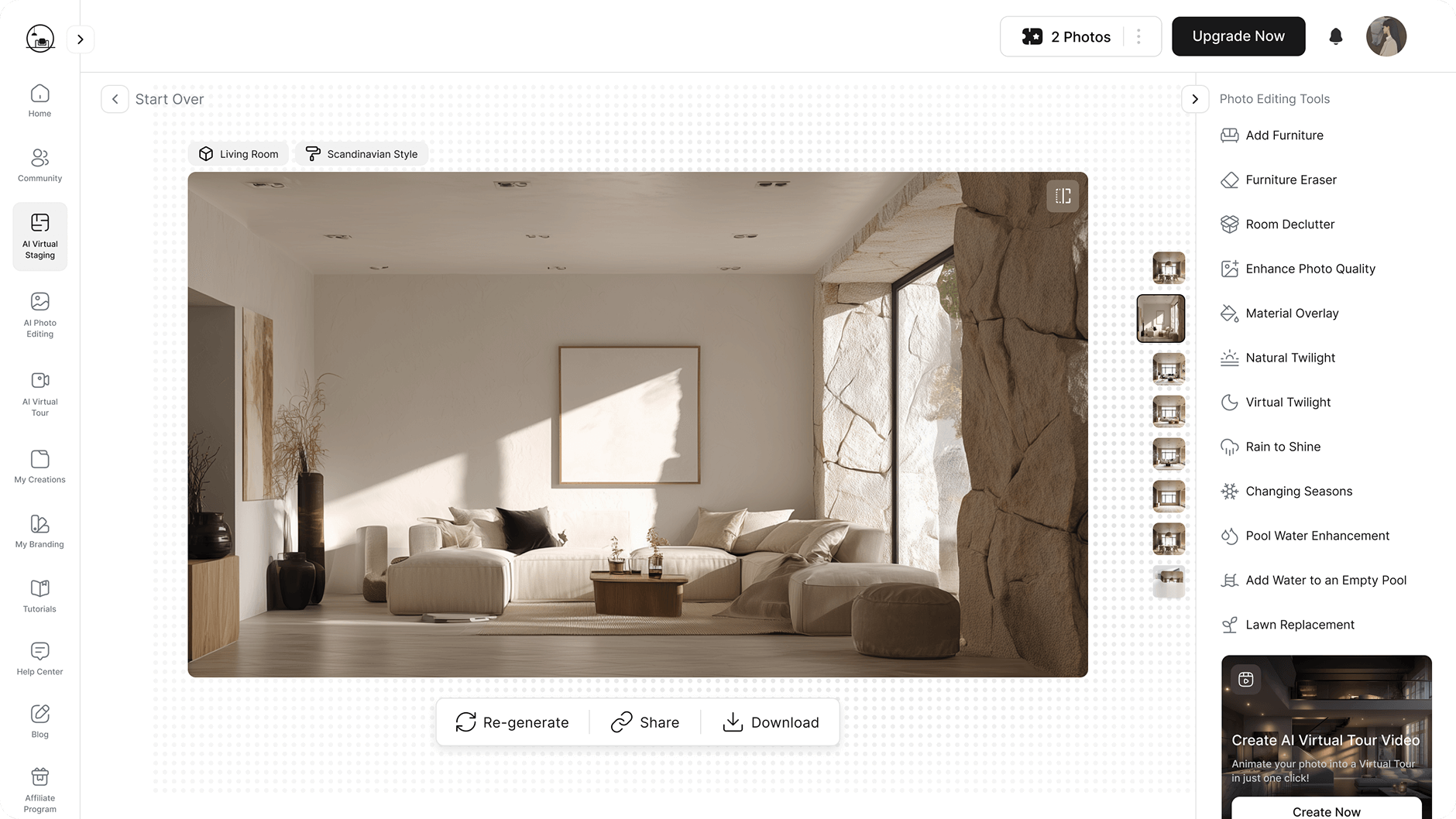
Collov.ai functions as an AI design assistant, helping users visualize interior design ideas and stage rooms virtually. It focuses on transforming existing spaces with a blend of AI recommendations and a curated furniture library. Collov.ai aims to simplify the design process, making it accessible for homeowners and designers alike.
- Best for: Homeowners looking for design inspiration and basic virtual staging, and designers needing quick mood boards.
- Key features: AI-powered design suggestions, virtual staging, furniture recommendations, style quizzes, and a product catalog integration.
- Pros:
- Good for generating design ideas.
- User-friendly interface.
- Offers product recommendations for staged items.
- Relatively quick staging process.
- Cons / limitations:
- Customization depth may be less than specialized design software.
- Realism can vary depending on the input image.
- Unlike Paintit.ai, which focuses on visual iteration, Collov.ai leans more into providing direct design suggestions.
- Pricing: Varies—check the official site.
- Try-on tip: Upload a photo of your living room to Collov.ai and see how its AI recommends furniture and decor. Then, use Paintit.ai to iterate on specific paint colors or material finishes on that new layout.
- If you choose this over others: You value AI-driven product recommendations and simplified design suggestions alongside virtual staging.
ReimagineHome.ai — Realistic Virtual Staging

ReimagineHome.ai specializes in delivering highly realistic virtual staging and renovation visualizations. It focuses on producing convincing images that can effectively market properties by showcasing their full potential. The platform provides tools for AI furniture removal and staging, allowing users to declutter and restage spaces digitally.
- Best for: Real estate agents, property managers, and professional stagers who need high-fidelity, marketing-ready images.
- Key features: Photo-realistic virtual staging, AI furniture removal, various design styles, professional-grade output, and efficient turnaround for staged photos.
- Pros:
- Excellent image realism.
- Effective for decluttering and virtual staging vacant homes.
- Streamlined workflow for real estate professionals.
- Offers a range of modern and classic design styles.
- Cons / limitations:
- May have a higher cost per image or subscription than simpler tools.
- Less emphasis on broad interior design planning compared to tools like Paintit.ai.
- Focus is more on final rendering than iterative design exploration.
- Pricing: Varies—check the official site.
- Try-on tip: If ReimagineHome.ai provides the initial high-quality staging, use Paintit.ai to explore alternative paint colors or flooring options on those staged images for a comprehensive look.
- If you choose this over others: Your priority is exceptional realism and marketing-grade virtual staging for real estate listings.
ApplyDesign.io — AI-Powered Room Design & Staging

ApplyDesign.io provides AI-powered solutions for room design and virtual staging, aiming to make interior visualization accessible. It allows users to upload photos and apply different design styles, making it an option for instant AI room stager needs. The platform emphasizes ease of use, similar to apps like Virtual Staging AI found on marketplaces.
- Best for: Small design businesses, real estate agents, and homeowners seeking straightforward virtual staging and design application.
- Key features: AI room design, virtual staging, style application presets, basic furniture placement, and simple interface.
- Pros:
- Good for quick design iterations.
- User-friendly for non-professionals.
- Supports various interior styles.
- Efficient for applying design concepts to photos.
- Cons / limitations:
- Depth of customization might be limited compared to more advanced tools.
- Output realism may not always match the very highest standards.
- If ApplyDesign.io feels too limited in style variations, Paintit.ai offers more extensive iterative design possibilities.
- Pricing: Varies—check the official site.
- Try-on tip: After staging a room in ApplyDesign.io, consider uploading that image to Paintit.ai to experiment with specific texture variations or material finishes that might not be available in ApplyDesign.io's library.
- If you choose this over others: You need a simple, intuitive tool for applying design styles and virtual staging without extensive feature sets.
Planner5D — 3D Home Planner with Virtual Staging AI integration

Planner5D is primarily a 3D home design and floor planning tool, now integrating AI virtual staging features. It allows users to create detailed 2D and 3D floor plans and then visualize them with virtual furniture and decor, often supported by AI suggestions. This makes it a comprehensive solution for initial layout planning combined with visualization.
- Best for: Homeowners and designers who need to plan layouts, create floor plans, and then virtually stage the designed spaces.
- Key features: 2D/3D floor planning, vast furniture library, interior/exterior design, AI-assisted furniture placement, and realistic rendering.
- Pros:
- Comprehensive for full home planning.
- Large object library for detailed customization.
- Allows for both structural and decorative planning.
- Supports a more holistic design approach.
- Cons / limitations:
- The learning curve is steeper than instant staging tools like Paintit.ai.
- AI staging features might not be as instantaneous or focused as dedicated AI virtual staging alternatives.
- Can be more time-consuming for simple staging tasks.
- Pricing: Varies—check the official site.
- Try-on tip: If Planner5D helps you with the initial room layout, consider taking a screenshot of the empty 3D room into Paintit.ai for instant AI styling and mood exploration before committing to specific furniture.
- If you choose this over others: You need a tool that combines detailed floor planning with virtual staging capabilities.
Detailed feature comparison (Buyer-centric)
| Feature / Tool | Paintit.ai | Collov.ai | ReimagineHome.ai | ApplyDesign.io | Planner5D (AI Staging) |
|---|---|---|---|---|---|
| AI Realism | High | Good | Very High | Good | Good |
| Customization Depth | Extensive (styles, materials, objects) | Moderate (styles, furniture suggestions) | Moderate (styles, furniture placement) | Moderate (styles, presets) | High (full 3D control, object library) |
| Input Method | Photo upload, text prompt | Photo upload | Photo upload | Photo upload | 2D/3D editor, photo upload |
| Furniture Removal | Yes (via AI transformation) | Limited | Yes | Limited | Yes (manual deletion in 3D) |
| Exterior Staging | Dedicated tools available | No | No | No | Yes (exterior modeling) |
| Shopping List | No (focus on visualization) | Yes (product integration) | No | No | No |
| Target User | Homeowners, Agents, Designers | Homeowners, Designers | Real Estate Agents, Stagers | Small Businesses, Homeowners | Homeowners, Designers, Architects |
| Pricing Model | Subscription/Credits | Subscription/Credits | Per image/Subscription | Subscription | Subscription/Premium features |
| Speed | Instant | Fast | Fast | Fast | Moderate (requires setup) |
| Learning Curve | Low | Low | Low to Moderate | Low | Moderate |
Professional tools for advanced users
While instant AI virtual staging tools like Paintit.ai excel in speed and accessibility, professionals often require a deeper level of control and precision. Tools for advanced users typically include features found in traditional 3D rendering software, but with AI enhancements. This means moving beyond simply applying a style to an image and into detailed 3D modeling, material mapping, precise lighting control, and the ability to customize every element. Architects, interior design firms, and large real estate developers might choose these options when they need bespoke furniture models, specific brand integrations, complex structural visualizations, or animations that instant visualizers cannot provide. These professional platforms prioritize granular control and realism suitable for high-stakes projects, often involving significant manual input from skilled operators alongside AI assistance.
Strategic recommendations (Decision framework)
- If you need instant visualization for quick ideas or real estate listings, choose Paintit.ai for its rapid turnaround and diverse style options.
- If you're a real estate agent prioritizing high-quality, realistic output for marketing vacant properties, choose ReimagineHome.ai for its focus on professional-grade virtual staging.
- If you're a homeowner looking for design inspiration with integrated product recommendations, choose Collov.ai.
- If you need a comprehensive tool for both floor planning and virtual staging, choose Planner5D.
- If you're exploring a wide array of AI tools and trying to find the best Virtual Staging AI alternative 2026, use platforms like Futurepedia or Aixploria to research your options.
- If you need a simpler, AI-powered tool for applying design styles to photos without extensive feature sets, choose ApplyDesign.io.
- If you are on a tight budget and seeking a cheaper alternative to Virtual Staging AI with robust features, explore Paintit.ai's competitive pricing and powerful visualization capabilities.
The ultimate hybrid workflow
A hybrid workflow combines the speed of AI visualizers with the precision of more detailed tools, leading to superior results.
- Ideation & Initial Visualization (Paintit.ai): Start by uploading your room photo to Paintit.ai AI Room Design. Quickly generate multiple design styles and furniture layouts. This stage is about rapid iteration and exploring various aesthetic directions to find a compelling concept.
- Refine & Customize (Specialized AI Staging): Once a promising concept emerges from Paintit.ai, take that AI-generated image or use your original photo in a dedicated virtual staging tool like ReimagineHome.ai or ApplyDesign.io. Here, you can focus on fine-tuning furniture placement, ensuring realistic lighting, and making adjustments for marketing-ready output.
- Detailed Planning & Materialization (Advanced Design Software): For projects requiring architectural precision or specific material integration, export key visuals to a more robust design software (e.g., SketchUp, Revit, or even Planner5D for structural elements). This allows for exact measurements, custom furniture creation, and detailed material specifications.
- Final Review & Presentation: Review all generated images for consistency and realism. Ensure the virtual staging accurately represents the potential of the space. Present the final, high-quality visuals to clients or integrate them into property listings.
Managing expectations (Current AI limitations)
While Virtual Staging AI offers incredible advantages, it's important to approach these tools with realistic expectations. AI, despite its sophistication, can still produce outputs that may have subtle inconsistencies or an "uncanny valley" effect, where realism is almost achieved but something feels off. Generated furniture might occasionally lack perfect scale, reflections could be slightly unnatural, or shadows might not align perfectly with light sources. Users should always review AI-generated images critically, verifying the plausibility of the design in the context of the room's architecture. Complex architectural details or highly specific design requests might push the current limits of generative AI, requiring manual touch-ups or intervention from a human designer. Always consider AI a powerful assistant, not a complete replacement for human oversight, especially when the final output needs to be flawless for high-stakes presentations or listings. {IMAGE:summary}
FAQ
How realistic are AI virtual staging results?
Realism varies significantly by tool and the quality of the input photo. High-end AI can produce very convincing results, but subtle artifacts or an unnatural feel can sometimes occur. Evaluating previews and comparing outputs from different tools is key.
Can AI virtual staging tools help with exterior visualization?
While most Virtual Staging AI tools focus on interiors, some specialized AI platforms, such as Paintit.ai's AI Exterior Design, offer dedicated solutions for visualizing exterior changes.
What's the difference between traditional virtual staging and AI virtual staging?
Traditional virtual staging involves manual editing by a human designer, often using 3D models and image manipulation software. AI virtual staging uses algorithms to automatically generate or place furniture and decor, offering faster turnaround times and often lower costs, making it a cheaper alternative to Virtual Staging AI services.
How much does AI virtual staging typically cost?
Costs range from free trials and per-image fees (e.g., $10-$50) to monthly subscriptions ($50-$500+) depending on features, usage volume, and the sophistication of the AI. For context, traditional virtual staging can range from $75 to $1,000+ per room depending on the service and complexity. Homelight provides a detailed breakdown of these costs.
Can I use AI virtual staging for unfurnished rentals?
Yes, AI virtual staging is particularly effective for unfurnished properties. It helps potential renters visualize the space's potential, understand scale, and imagine themselves living in the home, significantly enhancing listing appeal.
Do these tools offer AI furniture removal and staging capabilities?
Many advanced Virtual Staging AI alternatives, including Paintit.ai and ReimagineHome.ai, offer capabilities for AI furniture removal, allowing you to clear out existing items and then stage the empty space virtually.
Conclusion
The landscape of Virtual Staging AI alternatives in 2026 offers diverse solutions for every need, from instant visualization to comprehensive design planning. Whether you're a real estate agent aiming to enhance property listings, an interior designer seeking rapid ideation, or a homeowner exploring renovation possibilities, there's a tool tailored for you. The core benefit across these platforms remains speed, accessibility, and the power to transform empty or outdated spaces into aspirational homes. As the technology continues to evolve, expect even more sophisticated realism and deeper customization options. For those looking to dive in immediately with a user-friendly, powerful tool that excels at instant AI room stager functionality and style exploration, Paintit.ai stands out. Its intuitive workflow allows you to upload photos and experiment with diverse design possibilities, making visualization faster and more accessible than ever. Embrace the future of property visualization and design by exploring the right AI tools for your projects.
Trending
Virtual Staging AI: Top Alternatives & Competitors in 2026
How to Redesign a Living Room with Paintit.ai
How to Save, Compare and Organize Designs in Paintit Projects
How to Use Pinterest Inspiration in Paintit.ai
From Visualization to Transaction: How Paintit.ai Powers Autonomous Purchases for Furniture Brands
Related articles

7 min read
How to Use Paintit.ai for Perfect Dopamine Decor Color Combinations
Discover dopamine decor color combinations that boost your mood. Explore 4 curated palettes and visualize bold designs in your own room with Paintit.ai.
Yulii Cherevko
CEO paintit.ai

8 min read
Virtual Staging AI: Top Alternatives & Competitors in 2026
Compare top Virtual Staging AI alternatives in 2026: Paintit.ai, Collov.ai, ReimagineHome and more. Find the right tool for your budget and workflow.
Yulii Cherevko
CEO paintit.ai

9 min read
How to Redesign a Living Room with Paintit.ai
Learn how to redesign a living room with Paintit.ai using better layout logic, stronger focal points, realistic furniture scale, cleaner prompts, and more professional comparison workflows
Yulii Cherevko
CEO paintit.ai

8 min read
How to Save, Compare and Organize Designs in Paintit Projects
Learn how to save, compare, and organize designs in Paintit Projects to manage versions better, structure multi-room work, review alternatives faster, and make clearer design decisions
Yulii Cherevko
CEO paintit.ai

9 min read
How to Use Pinterest Inspiration in Paintit.ai
Learn how to use Pinterest inspiration in Paintit.ai with better reference selection, stronger prompt control, cleaner style transfer, and more realistic interior and exterior design results
Yulii Cherevko
CEO paintit.ai
5 min read
From Visualization to Transaction: How Paintit.ai Powers Autonomous Purchases for Furniture Brands
Bridge the gap between browsing and buying. Learn how Paintit.ai uses Visual-to-transaction AI and photorealistic rendering to power autonomous furniture sales
Yulii Cherevko
CEO paintit.ai